There is a specific silence that happens when a card does not mount. Everyone who shoots for a living meets it eventually, and the only thing that decides what happens next is a decision you made weeks earlier, when nothing was wrong.
The good news is that a routine which actually protects a wedding is short. It is not about buying more storage. It is about never letting a job exist in one place, even for one evening.
A card is a working file, not an archive
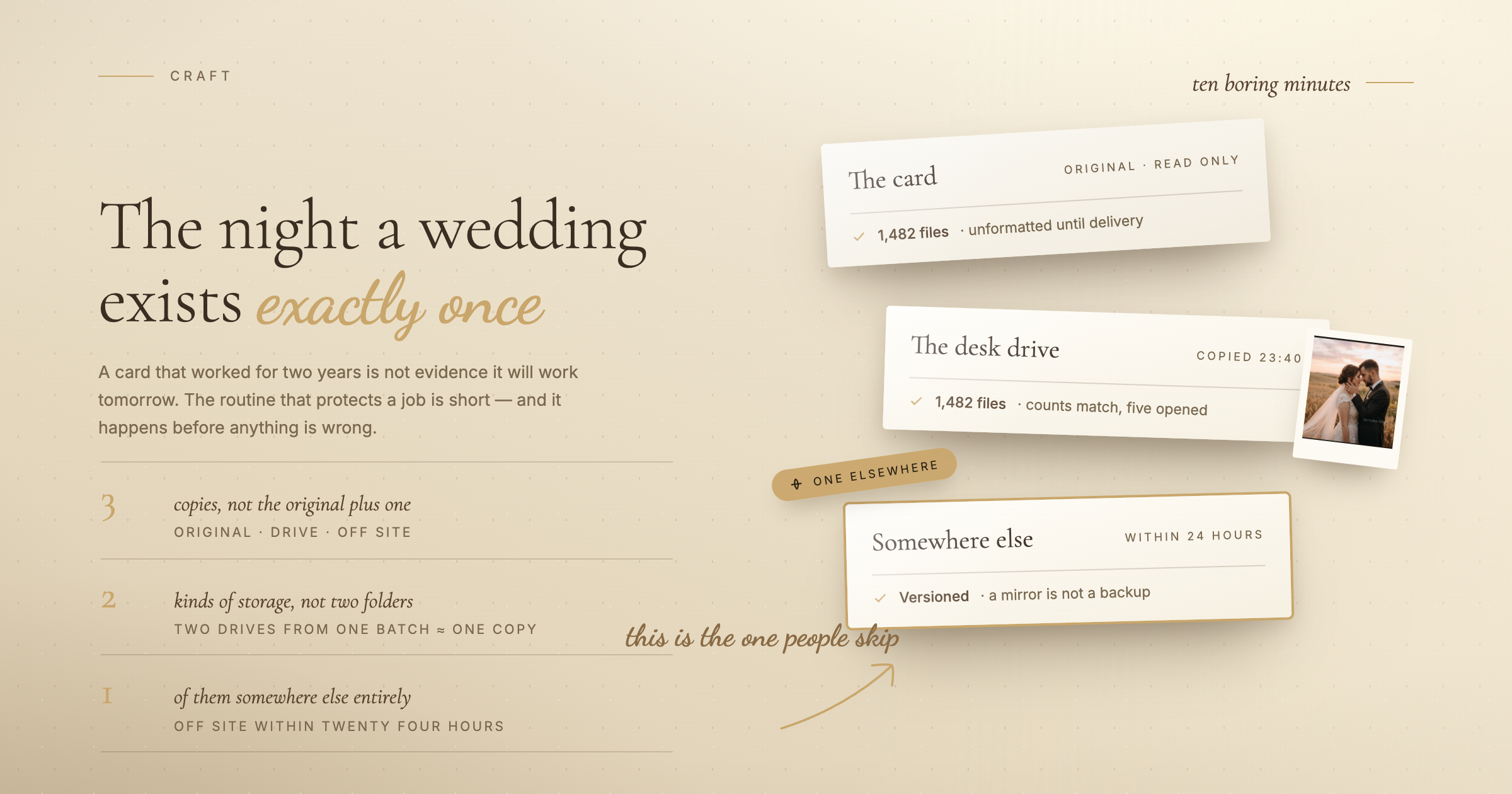
Memory cards fail in ways that give no warning, and they fail most often at the worst moment: full, hot, at the end of a long day. A card that has worked perfectly for two years is not evidence that it will work tomorrow.
The camera is not a backup either. Neither is "I will copy it in the morning". The night between the shoot and the copy is the most dangerous part of the whole job, because during it the entire event exists exactly once.
The rule, in plain terms
Three copies. Two different kinds of storage. One of them somewhere else.
- Three copies means the original plus two, not the original plus one. Two copies sounds like enough until you realise the failure you are protecting against is the one that happens while you are handling the files.
- Two kinds of storage means the copies are not all on the same sort of thing. Two folders on the same drive is one copy. Two drives bought on the same day from the same batch is closer to one copy than most people think.
- One somewhere else is the part people skip, and it is the part that covers the events that take the whole desk: theft, fire, flood, a laptop bag left on a train.
That is the entire theory. Everything below is how to make it happen without thinking about it.
What to do on the day
- Use two card slots if the camera has them, set to backup rather than overflow. Overflow gives you more capacity. Backup gives you the same frames written twice. Capacity is a cheaper problem than loss.
- Do not reformat a card until the job is delivered. Cards are the cheapest part of this. Buy enough that you never have to reuse one mid-season, label them, and treat a shot card as read-only until the gallery is out.
- Copy before you sleep, not before you edit. The offload is the priority, not the culling. Ten minutes of copying is what separates a bad day from a catastrophe.
- Copy to two destinations in the same session. A drive and the machine, a drive and a second drive. One copy, then one more, then you can go to bed.
- Get one copy off the premises within twenty four hours. An upload that runs overnight is fine. So is a second drive that lives at a relative's flat and gets swapped monthly.
Sync is not backup
This is the most common false sense of safety in the whole workflow, and it catches careful people.
A sync folder mirrors what you do. Delete a folder by accident and the deletion syncs. Overwrite a file and the overwrite syncs. Corrupt a file and the corruption syncs, politely and instantly, to every machine you own.
Real backup keeps a copy of what was there before. If your cloud service has version history and a deleted-files window, learn how long it is and how to restore. If it does not, it is convenient storage, not a safety net.
Verify instead of assuming
A copy that silently failed is worse than no copy, because you stop worrying.
- Check the file count on both sides before you close the window. It takes five seconds and catches most partial transfers.
- Open a handful of files from the destination, not from the card. Especially the last few, since interrupted copies fail at the end.
- Use a tool that verifies while it copies if your camera makes large files. Several free ones compare checksums after transfer, which is the only way to catch a byte that changed in flight.
Card hygiene, which costs nothing
- Format in the camera, never in the computer. The camera writes the file structure it expects.
- Format rather than delete. Deleting individual frames on a card is a good way to confuse a filesystem that was never designed for it.
- Retire cards on a schedule, not on failure. Write the purchase date on each one with a marker. Cards are consumables, and a card that has been through two seasons has earned retirement.
- Carry more cards than you need and fewer large ones. Four smaller cards mean a single failure costs you a quarter of the day rather than the whole of it.
What to keep, and for how long
The delivered gallery is not your archive. It is a delivery, and it may expire.
Keep the edited set indefinitely if you can, since it is small and it is the thing clients come back for years later. Keep the RAW files at least as long as your contract says you will, and be specific about that in the contract rather than vague. Deciding in advance what you throw away is what keeps the archive from becoming unusable.
When it does go wrong
- Stop using the card immediately. Do not shoot on it, do not let the camera write anything else to it. Every write reduces what recovery can find.
- Try recovery software before a lab. Card recovery tools read the raw contents and often find everything. Copy the recovered files somewhere new, never back onto the same card.
- Tell the client early and plainly. If something is genuinely lost, they will forgive the accident far more readily than the discovery that you knew on Tuesday and said nothing until Friday.
The ten minute routine
- Two slots set to backup, if the camera has them
- Card stays unformatted until the gallery is delivered
- Offload the same night, to two destinations
- File counts checked, a few files opened from the copy
- One copy off site within a day
- Cards dated, and retired after two seasons
None of this is interesting, and that is rather the point. The photographers who never tell a card-failure story are not luckier. They just did ten boring minutes on the night of every job.